
Melody Keys: Piano Beat
DigitalFishMusic
0.00.00 Reviews
- Version
- 1.4
- Installs
- 10.00K
- Age Rating
- Everyone
Screenshots



Our Review of Melody Keys: Piano Beat
 Analysis by Appyee
I tend to judge a mobile music game by a simple test: can I pick it up for a few minutes, understand what the screen wants from me, and enjoy the rhythm without needing a quiet room or a long tutorial? Melody Keys: Piano Beat is built around that quick, tactile appeal. Colorful notes descend toward a red line, and the basic challenge is to tap them in time. It is a straightforward idea, but it gives music fans a small, immediate goal that works well for a short break.
That simplicity is also the first thing to keep in mind if you are deciding whether to try it. This is a music game, not a piano course: tapping notes can sharpen your timing and attention, but it is not the same as learning hand position, reading sheet music, or practicing an instrument. I would recommend it to someone who wants a lightweight rhythm challenge, rather than someone expecting a structured path to becoming a pianist.
First Impressions and Interface
The first practical question is what to do when the game does not feel responsive. With a tap-based rhythm game, a note can pass the line before you react, or a tap can feel late even when you think you were on time. I would begin by checking the basics: make sure the screen is clean and dry, hold the device in a comfortable position, and try a short session without rushing. Small changes to grip and finger placement can make a surprising difference when notes arrive close together.
If a session feels uneven, I would also close distractions and give the game your full attention for a moment. That is not a special setting or a guaranteed fix; it is simply a useful way to tell whether the problem is timing, an awkward playing posture, or something else. On a small phone, your fingers may cover part of the play area, so a relaxed grip and deliberate taps are often more helpful than trying to move faster.
When I first opened Melody Keys: Piano Beat, I was immediately struck by its sleek and user-friendly interface. The app doesn’t bombard you with complicated menus or overwhelming features. Instead, it welcomes you with a simple and clean design, making it incredibly easy for both beginners and seasoned players to dive right in.
For a sensible setup, I would start with a modest goal: play one short session and see whether the notes are comfortable to reach. If the screen seems crowded, try turning the device only if the game itself supports the orientation you prefer; I would not assume that every phone or tablet layout behaves the same way. Keep the device steady on a table or in both hands, and avoid balancing it while walking. Rhythm play rewards a stable view more than a dramatic posture.
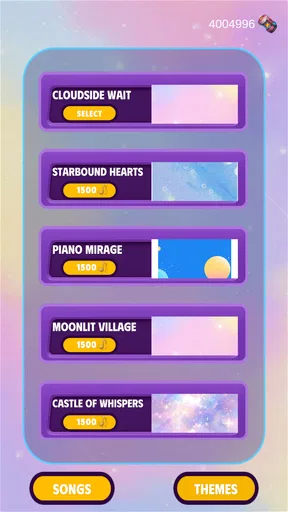
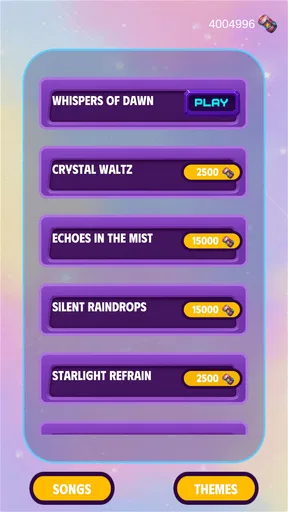
The home screen is neat, displaying a selection of songs categorized by genre, difficulty, and popularity. It’s like having a personal music library tailored just for you. Whether you’re into pop, classical, or electronic, you’ll find something that piques your interest.
Gameplay and Features
Now, let’s talk about the heart of the app—the gameplay. The app allows you to play along with a wide variety of songs by tapping on the falling tiles, which represent piano notes. It’s a bit like a rhythm game but with a sophisticated twist. The tiles fall in sync with the music, creating a seamless and immersive experience.
One of the coolest features is the ability to adjust the tempo. Feeling confident? Speed it up! Need a breather? Slow it down. This flexibility makes it accessible for players of all skill levels. Plus, there’s a practice mode where you can focus on tricky sections until you nail them.
The app also offers a multiplayer mode, which is a fantastic way to challenge friends or pit your skills against players worldwide. It’s a competitive edge that adds a whole new layer of excitement.
My most useful tip for practice is to treat a difficult passage as a coordination problem, not a test of reflexes. If you can adjust the tempo, begin at a pace that lets you notice where your taps go wrong, then raise it only after the pattern feels comfortable. In a practice mode, repeating a troublesome section can be more productive than replaying a whole song and hoping the tricky moment goes better. That approach keeps a quick game from turning into a frustrating loop.
For an everyday use case, imagine having a few minutes before a bus arrives or while taking a break between tasks. I would choose a familiar song or a slower passage, play one round, then stop rather than letting a rushed session become a string of missed notes. On a commute, the game is best when you are seated and can hold the screen steadily; tapping while walking is both awkward and a poor way to watch your surroundings. For a longer, more focused session at home, headphones can help you follow the beat without raising the device volume, though the screen and your taps still need to stay comfortable.
Compared with many music games that lean heavily on score-chasing, a note-tapping piano format has an appealingly direct feel: your attention stays on the incoming pattern and the music. It is less suited to someone looking for a full instrument simulator, free-form composition, or step-by-step music theory. If your main aim is to learn songs on a real keyboard, a lesson-focused app or an actual instrument will be a better fit. If you simply want an approachable way to engage with rhythm, this format is easier to dip into.
Sound Quality and Song Selection
The sound quality is top-notch. Each note is crisp and clear, making you feel like you’re actually playing a real piano. The app developers have done a remarkable job in ensuring that the audio is both rich and authentic, which is crucial for an app of this nature.
As for song selection, it’s vast and frequently updated. The library includes classics like Beethoven’s "Für Elise" as well as contemporary hits. You’ll have plenty of options to keep you entertained and challenged.
A useful way to judge the song library for yourself is to look beyond whether a title is familiar. Pay attention to whether the arrangement feels comfortable at the pace you can currently manage, and whether you enjoy repeating it. A recognizable melody can be motivating, but a passage that is too demanding may make a short session feel like work. I would rotate between something easy enough to enjoy and a piece that gives you a modest challenge, rather than choosing only the hardest option.
Customization and Personalization
Another great aspect of Melody Keys: Piano Beat is its customization options. You can change the look of your keyboard and even select different sound effects. Want your piano to sound like a harpsichord or an organ? Go for it! This level of personalization ensures the app never gets stale.
There’s also a neat feature where you can upload your own songs. This is a game-changer if you want to play along to something specific that isn’t in the app’s library.
Customization is most useful when it helps you stay focused, not when it becomes a detour. I would try one visual or sound change at a time, then play the same passage again so you can tell whether it actually suits you. A different tone can make a familiar pattern feel fresh, but it may also make the notes feel less like the piano sound you expect. Likewise, a personal song choice is only valuable if it works well for the way you want to play; I would not assume every track will translate into an equally clear or comfortable challenge.
Keeping a Session on Track
If the game seems to stall or a round does not go as expected, I would avoid changing several things at once. First, return to the song selection and start a fresh attempt. If that does not help, close and reopen the game, then check that the device itself is responding normally to taps. This simple sequence helps separate a temporary hiccup from a pattern that is simply difficult to play. It is also kinder than repeatedly tapping in frustration, which rarely improves timing.
When a song feels out of sync, take a moment to notice whether the audio is interrupted elsewhere on the device or whether the issue appears only during play. A busy device, an unstable connection, or audio routed through another accessory can affect how a session feels, even when the game is not the source of the problem. I would test again in a calmer setup before deciding that the timing is wrong. If the same passage remains difficult while other taps register normally, slowing the tempo or choosing a more manageable selection is the more useful next step.
One question players often have is whether this is suitable for a complete beginner. I think it can be, because tapping falling notes is easy to understand, and tempo adjustment and practice mode offer ways to approach a hard section at a gentler pace. Still, a beginner should treat success as learning the game’s timing, not as proof of piano ability. The play pattern can build a sense of rhythm, but it does not replace instruction on an instrument.
It is also worth thinking about cost before settling into a routine. The game is free to start, while in-app purchases range from $0.49 to $99.99 per item. I would check each purchase carefully and decide whether it adds something you actually want before spending. If you are only curious about the core tapping challenge, there is no need to treat optional purchases as part of the basic decision to try it.
Who Will Enjoy It, and Who Should Look Elsewhere
I see the strongest fit for casual players who like music, quick reflex challenges, and a clear goal on screen. It can also suit someone who wants a brief change of pace from word puzzles or endless scrolling: choose a song, focus on the incoming notes, and give your attention one small task. DigitalFish’s game has reached over ten thousand installs, and its Everyone age rating makes it broadly approachable for families, though adults should still make their own choices about purchases and play time.
I would steer away from it if you want an exact simulation of a piano, a full lesson plan, or a social experience that depends on reliable online competition every time you play. Multiplayer may appeal when you want to compare skills, but the most dependable reason to open a rhythm game is usually the solo challenge you can start on your own. If you dislike repeating a passage to improve your timing, the central loop may feel repetitive rather than satisfying.
Overall Enjoyment and Final Thoughts
Overall, Melody Keys: Piano Beat is a must-try for anyone who loves music or rhythm games. It’s a perfect blend of entertainment and creativity, offering hours of enjoyment. Whether you’re winding down after a long day or looking to impress your friends with your newfound piano skills, this app has got you covered.
In conclusion, if you’re on the hunt for an app that’s both fun and musically enriching, look no further. Download Melody Keys: Piano Beat and let your musical journey begin!
A Practical Recommendation
The game is free, developed by DigitalFish, and its current version is 1.4. It was released on May 28, 2025, and requires Android 8.0 or later. Those details make it straightforward to decide whether your device can run it, but I would still leave room on the device and keep the operating system current as sensible general housekeeping. The age rating is Everyone, so the basic presentation is intended for a wide audience.
My practical verdict is to try it if you want a compact, music-centered game that rewards attention and repeated attempts. Give yourself a steady setup, start with a comfortable pace, and use a tricky section as a chance to adjust rather than a reason to quit. Skip it if your real goal is formal piano instruction or a deep music-making workspace. For everyone else, it offers an approachable way to turn a few spare minutes into a focused rhythm challenge.
Verdict
Strengths of Melody Keys: Piano Beat
- Intuitive interface for all skill levels.
- Wide selection of popular songs to play.
- Offline mode available for uninterrupted play.
- Engaging graphics enhance the experience.
- Regular updates with new content.
Limitations of Melody Keys: Piano Beat
- In-app purchases can be pricey.
- Ads can interrupt gameplay frequently.
- Limited customization options for themes.
- Requires large storage space on devices.
- Some songs locked behind paywall.
Similar Picks in This Category
View All
Tiles Hop Music & Ball Game
AMANOTES PTE. LTD.4.3

Magic Tiles 3™ - Piano Game
AMANOTES PTE. LTD.4.6

Real Piano
Bilkon3.7

Piano Game: Classic Music Song
Dream Tiles Piano Game Studio4.0

Smash Colors: Music Ball Rush
BADSNOWBALL HONGKONG LIMITED4.2

Piano Music Go-EDM Piano Games
Joy Journey Music Games4.5
Frequently Asked Questions
What is Melody Keys: Piano Beat?
Melody Keys: Piano Beat is an engaging rhythm-based game where players can enjoy tapping to the beat of popular songs on a virtual piano. The app combines the challenge of timing with the fun of music, offering a wide range of tracks across various genres to keep users entertained.
Is Melody Keys: Piano Beat free to play?
Yes, Melody Keys: Piano Beat is free to download and play. However, it offers in-app purchases that allow players to unlock additional songs, remove ads, or gain other premium features. This model gives players the flexibility to enhance their experience as they choose.
What devices are compatible with Melody Keys: Piano Beat?
Melody Keys: Piano Beat is available for both Android and iOS devices. It requires a relatively recent OS version to ensure smooth gameplay. Users should check the app store listings for specific compatibility details to ensure the game runs optimally on their devices.
How does the game improve over time?
The game regularly updates its song library, adding new tracks and features to keep the experience fresh. Developers also release updates to fix bugs and enhance performance. Players are encouraged to keep the app updated to enjoy new content and improvements.
Is Melody Keys: Piano Beat suitable for all ages?
Melody Keys: Piano Beat is designed to be family-friendly, offering gameplay that is suitable for all age groups. The intuitive controls and diverse music selection make it accessible to both younger players and adults, providing entertainment for everyone in the family.
Play our best games!


